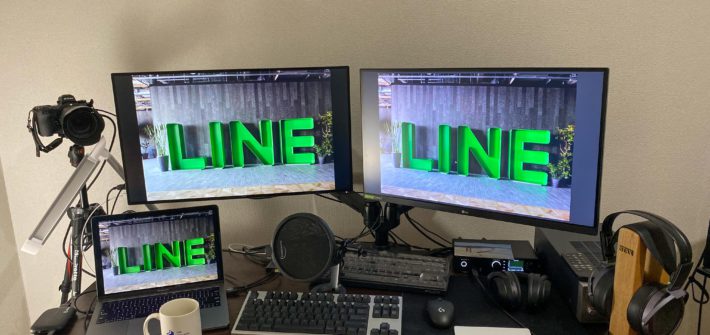
Recently, due to the pandemic, more and more companies have adopted work-from-home policies. I have been working from home for LINE Japan since the end of February. Because of this, I've gradually purchased various equipment to create a better work environment and boost my efficiency. This article will introduce the equipment I use and my experience with it, serving as a reference for readers who need to work from home for various reasons. **Article Structure** This post categorizes the equipment into four main types: 1. Computer-related 2. Video Conferencing 3. Entertainment 4. Others Some items were bought out of personal interest and might not be necessary for general remote work; I will also briefly mention alternative solutions in the text. **Computer-related** Equipment used: - MacBook Pro 13-inch - Dell U2718Q 4K Monitor - LG 27GL850-B QHD Monitor - Amazon Basics Monitor Arm - Realforce for Mac 87-key Keyboard **Laptop or Desktop** A good laptop or desktop can significantly increase productivity, especially for software engineers. A better machine can save a lot of time during testing or compilation. I use a company-issued MacBook Pro 13-inch, which is sufficient for coding. Since most compilation and testing run in the cloud, performance issues aren't a major concern. While Macs are a bit pricey, you don't need to buy one if your company provides a laptop. If you're buying your own, a laptop or desktop with an SSD costing around 20,000 TWD is generally enough for standard use. **Monitors** One or two large monitors are essential for an engineer. Usually, having one screen for code and another for reference materials eliminates the need to constantly switch windows, improving efficiency. I prefer 27-inch [...]
Stax SR-009BK/SRM-727A 開箱
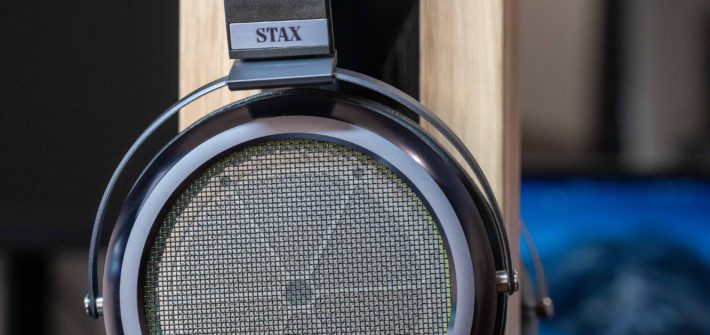
As a software engineer, how can you code without a good pair of headphones? Thus, here is an unboxing post—completely unrelated to technology—for the limited edition Stax SR-009BK (only 180 units) and the SRM-727A electrostatic headphone amplifier. **Foreword** Bored at home during the pandemic, I found myself browsing various online shopping sites. I stumbled upon Fujiya-Avic, and my hands started itching again. I saw that they actually had the 009BK, and it was even slightly cheaper than the standard 009... Ever since I heard the D8000 Pro, I've wanted to upgrade my headphones. In a moment of weakness, I clicked "buy" on both the headphones and a refurbished 727A. **Unboxing** Yesterday, right in the middle of a Zoom meeting, the doorbell suddenly rang. I quickly told my colleagues I had a package and ran to sign for it. Yamato Transport delivered a large box with familiar contents. Without further ado, I rushed to unbox it after the meeting. **009BK Outer Box:** Inside the box is a wooden case. It's surprisingly light but looks very high-quality. Opening the case and removing the foam padding reveals the 009BK itself. I received number 178 out of the limited 180 units. The appearance is exquisite, truly a piece of craftsmanship. The 727A box is relatively simple—just a standard cardboard box containing the unit. I immediately plugged it in to start listening. **Impressions** Tracks: - Eagles: Desperado, The Last Resort - Ikimonogakari: SAKURA, YELL [...]
日本 LINE 工作三個月心得

Through a series of events, I arrived in Japan at the end of 2019. After joining the company in January 2020, I am about to receive my third paycheck in Japan. Since graduating from university, I went straight into military service and then joined as a new graduate, so it's been a long time since I've written anything. Taking advantage of the extra free time from working from home during the pandemic, I'm recording my thoughts on my first job and my first time working abroad. This post mainly covers my experiences living in Japan for three months, including work and leisure life after hours. **Why I chose LINE Japan** During my senior year, I learned through a stroke of luck that LINE had an opening for an Infrastructure Engineer. A community peer asked if I wanted to interview. At the time, I hadn't finished the process for a full-time conversion at Google, so I figured interviewing would be good experience. You can refer to this post for the detailed interview process: LINE Tokyo Interview Experience. To my surprise, I passed the interview, and I hesitated for a long time between this and an offer from Google in Changhua. Ultimately, although I would save less money at LINE and had to leave my social circle, I chose LINE for the job content and future career development. **Work Culture** LINE's work culture is quite different from the traditional Japanese companies I imagined—no daily suits, no extreme deference to superiors, and no mandatory drinking with bosses after work. Instead, it feels more like a foreign multinational. Engineers don't need to wear suits or ties; colleagues dress casually, and there's no social pressure to drink with managers after hours. We have flexible working hours. Although we need to clock in, it's essentially a results-oriented system. Most colleagues arrive around 11 AM. If something comes up at home, we can work from home, which is very liberating. However, my team seems to have many workaholics; I sometimes see people submitting pull requests or replying to messages late at night. Personally, I usually don't handle company matters after hours unless it's an emergency. **Colleague Interaction and Communication** Communication between colleagues is primarily in English. After all, 7 out of the 13 people on our team are not Japanese, so there's no need to worry about not knowing Japanese. The biggest downside of not knowing Japanese is that it's harder to make small talk with Japanese colleagues, but I can still chat in Chinese with Taiwanese and Chinese teammates. Additionally, the company provides free Japanese, English, and Korean classes, which anyone interested can apply for. Interactions are very harmonious. Colleagues are very willing to answer questions and help find solutions. Sometimes, hearing their perspectives leads to unexpected solutions. **Work Environment** The work environment at LINE is very comfortable. You can check out the introduction to the LINE Fukuoka office; the photos there are similar to the Tokyo office. Everyone gets a large electric standing desk and a Herman Miller Aeron chair. Most people choose to apply for two [...]
Introduction to Calico Basic Architecture

Calico is a pure L3 datacenter networking solution that integrates seamlessly with Kubernetes and OpenStack. It is also one of the most commonly used CNIs for Kubernetes. This article will introduce Calico's basic components and architecture. **Basic Components** Calico consists of the following independent components: - **Felix:** A Calico agent that runs on every endpoint. - **Orchestrator plugin:** Code that integrates Calico with different orchestrators. - **etcd:** Used for data storage. - **BIRD:** A BGP Agent that distributes routing information. - **BGP Route Reflector:** Required in larger network environments. I will introduce these components one by one. **Felix** Felix is a daemon that runs on every host providing endpoints, which in most cases refers to hosts running VMs or containers. Felix is responsible for configuring routes, ACLs, and other functions, essentially handling the network connectivity settings required on the host. Depending on the platform, Felix [...]
RDMA over Commodity Ethernet at Scale – Paper Review
在上一篇文章 RDMA Overview 中簡單了介紹了一下 RDMA 這個技術,這次將為 Microsoft 在 2016 年 SIGCOMM 發表關於他們資料中心大規模應用 RDMA 所撰寫的論文 RDMA over Commodity Ethernet at Scale 做簡單的導讀。 Abstract Over the past one and half years, we have been using RDMA over commodity Ethernet (RoCEv2) to support some of Microsoft’s highly-reliable, latency-sensitive services. This paper describes the challenges we encountered during the […]
RDMA Overview
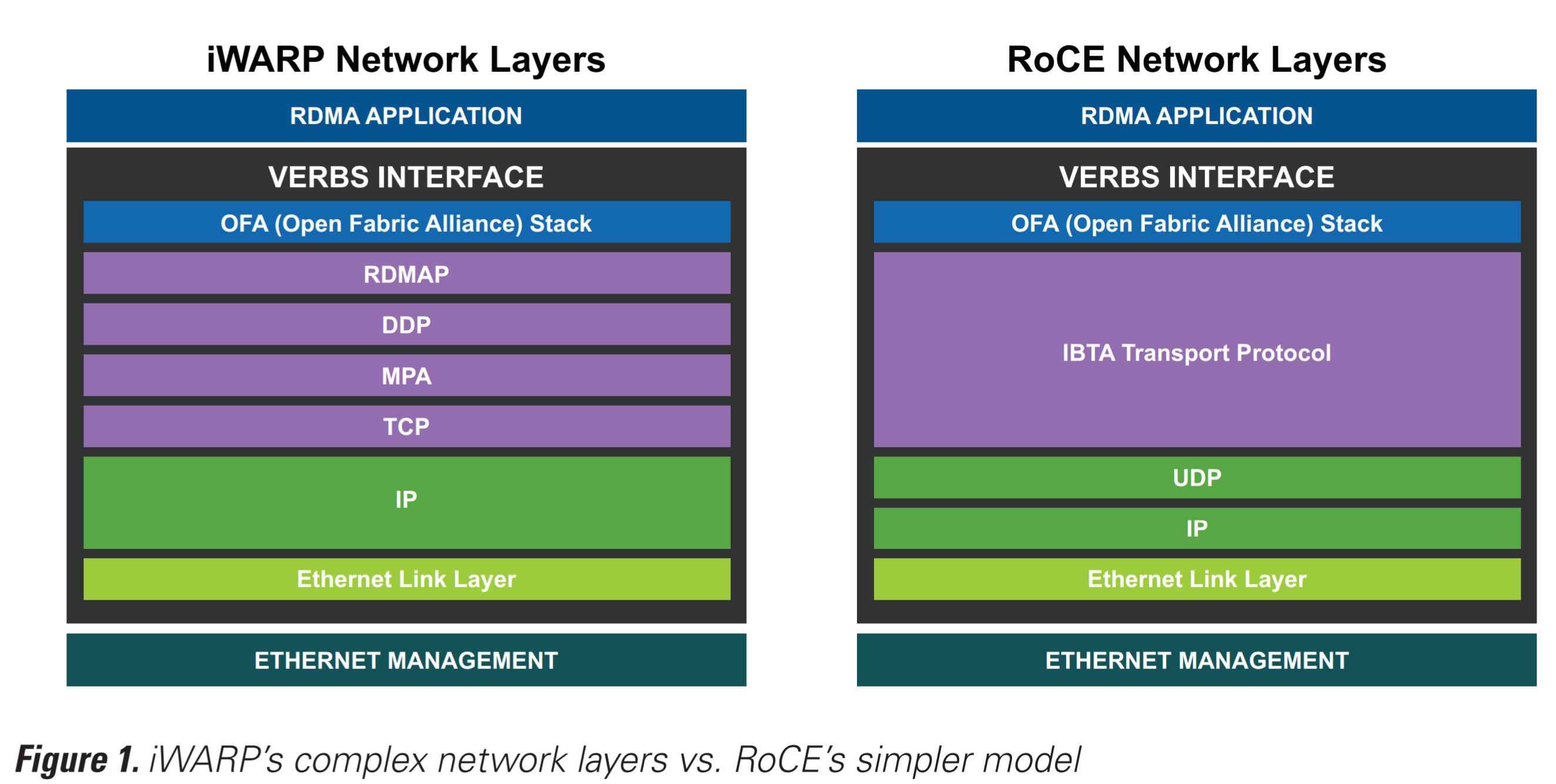
Latency problems are harder because the speed of light is fixed; you can’t bribe God —David Clark 近年來網路頻寬雖然大幅提升,kernel 處理封包的能力卻沒有顯著提高。為了更進一步提高頻寬跟降低延遲,RDMA 和 DPDK 等技術出現,跳過了 kernel 直接處理 packet。本篇將會介紹現今 RDMA 相關的技術,比較,以及一些問題。 High Level Overview RDMA 技術基本上都是把 transport layer offload 到網卡上,避免使用 kernel 做封包處理,把 CPU 從 critical path 中拿除。顧名思義,這可以讓設備直接寫入其他設備的虛擬記憶體,在可控制的環境中達成 10 毫秒左右的傳輸延遲。但是傳統的 RDMA 有兩個很大的缺點: 需要支援 RDMA 的 lossless network,也就是 Infiniband 因而需要在環境中額外放 Infiniband […]
LINE Tokyo Interview Experience
因緣際會之下在社群朋友的介紹下得知 LINE 有在找 Private Cloud 的 Infrastructure Developer Engineer。剛好 LINE 也使用 OpenStack 並且正在導入 Kubernetes,是我本身經驗比較多的領域,也即將在 2019 大學畢業,就抱著就算沒有上也能增加經驗的想法投了履歷。目前也已經面試完畢並且拿到 offer,決定來寫一篇介紹一下 LINE 面試過程以及一些心得給有興趣加入 LINE 的人參考。 面試內容 職缺:インフラ開発エンジニア(Private Cloud プラットフォーム) 翻譯成英文大概是 Infrastructure development engineer (Private Cloud platform) 面試方式:Skype Pre-test 面試前會有一次簡單的 pre-test,裡面會有幾題簡單的 coding 題目。寫完後後面會需要提供一些資訊,包括對各種 coding 相關 tool 的熟悉度,跟一些面試原因等很基本的問題。大概花個一個小時左右就能夠寫完了,不過寫到的內容後續面試可能會被問到,要注意一下。 第一次面試 第一次面試會是工程師來面試,問題的內容會比較 technical 導向。面試的問題就我來說基本上都是履歷上寫到的經驗,不過我的部分可能比較沒有參考價值,因為我經驗大多都注重在 OpenStack 上面,又因 LINE 的 private cloud 也是用 OpenStack 建的,因此大部分內容都是 […]
Introduction to Podman

Podman 曾經是 CRI-O project 中的一部分,後來被分離出成為一個獨立 project, libpod。Podman (Pod Manager) 的目標是提供一個跟 Docker 相似體驗的 container CLI,提供給使用者創立和運行 container。 開始之前 我們先來唸一段 All System Go Replacing Docker with Podman 中演講的一段宣言 I promise To say container registries rather than docker registries I promise To say container images rather than docker images I promise To say containers or OCI containers rather than […]
Ceph and OpenStack: Best Practices (Part II)
上個禮拜介紹了 Ceph and OpenStack – Best Practices Part I,而這次要接續之前的建議再多介紹幾個 Ceph 跟 OpenStack 整合的最佳實踐。額外使用這些設定可以更加的整合 OpenStack and Ceph。 使用 RAW Image 在前一篇 Ceph and OpenStack – Best Practices Part I 中介紹了 RBD 本身有 layering 的功能,不過這個功能是有些限制的。上傳到 OpenStack 的 Image 必須是 RAW 格式才會利用到 RBD layering。所以會建議所有上傳上去的 image 都先轉成 RAW 格式。透過 qemu-img 指令可以很容易的轉換各種格式: qemu-img convert image.qcow2 image.raw 之後將 RAW 格式的 image […]
Ceph and OpenStack: Best Practices (Part I)

Ceph and OpenStack 現在已經是 IaaS 中成雙成對的一個組合。根據 2017 年 6-12 月的 OpenStack User Survey,在所有 OpenStack Deployment 中,有 57% 的部署使用的 Cinder backend 為 Ceph RBD。當然在使用 Ceph 作為 OpenStack Glance, Cinder 的 backend 會有一些能夠在設定上調整的最佳實踐。本篇文章將會介紹這些如何調整以及為什麼要進行這些設定。 在 Glance 中使用 show_image_direct_url 使用 Ceph RBD 時,預設會開啟 RBD Layering 這個功能,可以把它想像成一個可以讀寫 snapshot。這會建立一個原本 image 的 clone,而 Ceph 就只會建立跟原本 image 不同部分的 RADOS Objects。這代表了兩件事: 省空間 — 因為只會建立相對原本 […]

