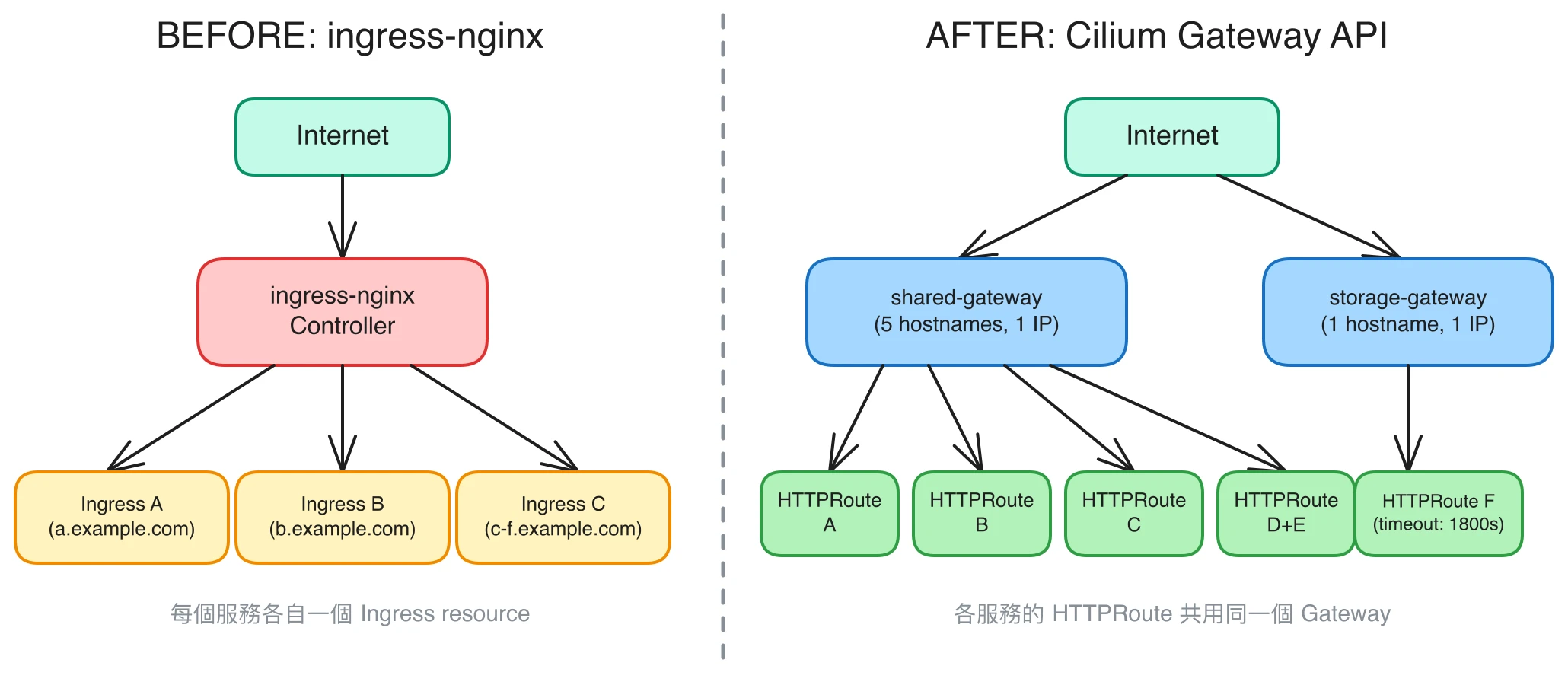
前陣子看到 ingress-nginx 宣布 deprecated,其實也不太意外,Kubernetes 官方推 Gateway API 也推了好一陣子了。我的叢集上跑著六個服務,一直都是用 ingress-nginx 做路由,於是趁這個機會全部遷移到 Cilium Gateway API。
本文記錄遷移過程和途中踩到的幾個坑。
Table of Contents
環境
- CNI:Cilium v1.18.6
- TLS:cert-manager(Helm)
- DNS-01 Provider:Cloudflare
Gateway API 快速介紹
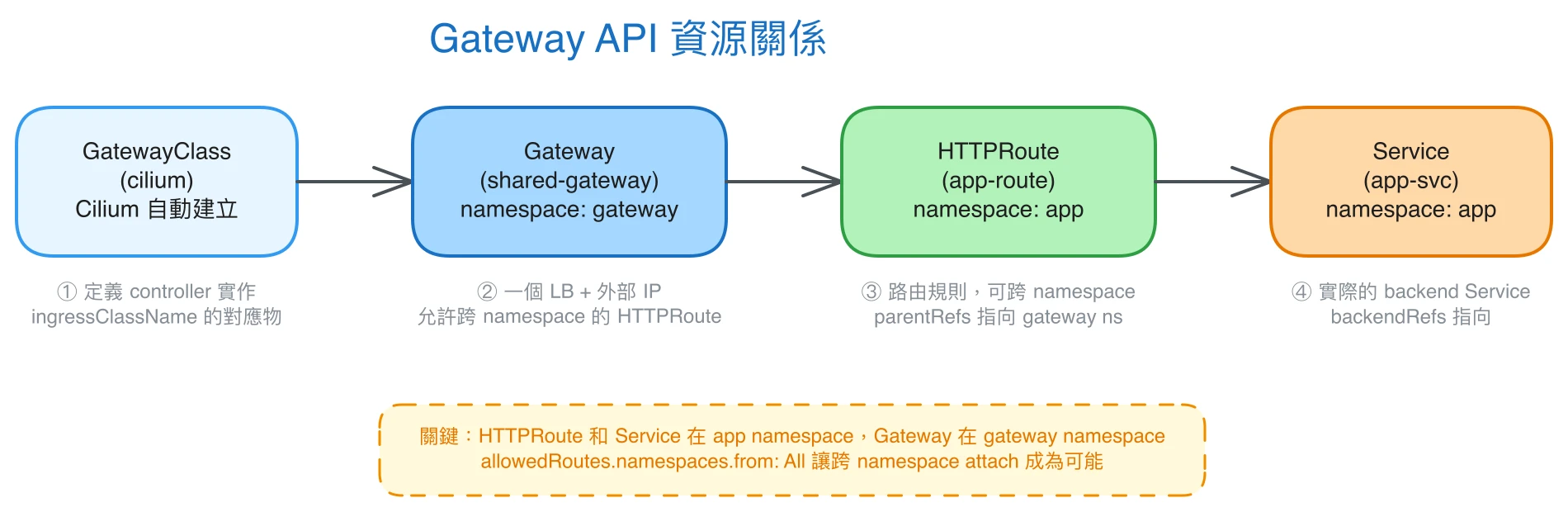
在開始之前先簡單說明 Gateway API 的三個主要資源,不然後面看 YAML 會有點迷失。
GatewayClass 定義 Gateway 的實作方式,概念上類似 Ingress 的 ingressClassName。Cilium 安裝後會自動建立一個叫 cilium 的 GatewayClass。
Gateway 代表一個實際的 load balancer。一個 Gateway 可以有多個 listener,每個 listener 對應一個 port/protocol/hostname 的組合。
HTTPRoute 定義路由規則,指定流量要送到哪個 Service。跟 Ingress 最大的不同是 HTTPRoute 可以跨 namespace 引用 Gateway,後面會用到這個特性。
架構設計
Cilium 每建一個 Gateway 就會產生一個獨立的 LoadBalancer Service,也就是每個 Gateway 都要消耗一個外部 IP。我的環境外部 IP 數量有限,所以設計成:
- 一個 Shared Gateway,放在
gatewaynamespace,用 SNI 讓同一個 IP 服務多個 hostname。 - 一個獨立 Gateway 給需要大檔案上傳的服務,timeout 需求跟其他服務差太多,拆開比較好管理。
Shared Gateway 的做法是每個 HTTPS hostname 各建一個 listener,Envoy 用 SNI 做 TLS termination 後分送到對應的 HTTPRoute:
# gateway/gateway.yaml(節錄)
listeners:
- name: https-app-a
  port: 443
  protocol: HTTPS
  hostname: app-a.example.com
  tls:
    mode: Terminate
    certificateRefs:
    - kind: Secret
      name: app-a-tls
  allowedRoutes:
    namespaces:
      from: All
- name: https-app-b
  port: 443
  protocol: HTTPS
  hostname: app-b.example.com
  # ... 其餘 listener 同理
allowedRoutes.namespaces.from: All 這個很重要——少了它,其他 namespace 的 HTTPRoute 就沒辦法 attach 到這個 listener。
各服務的 HTTPRoute 建在自己的 namespace,透過 parentRefs 跨 namespace 指向 Gateway:
# app-a/httproute.yaml
apiVersion: gateway.networking.k8s.io/v1
kind: HTTPRoute
metadata:
  name: app-a-route
  namespace: app-a
spec:
  parentRefs:
  - name: shared-gateway
    namespace: gateway
    sectionName: https-app-a
  hostnames:
  - "app-a.example.com"
  rules:
  - matches:
    - path:
        type: PathPrefix
        value: /
    filters:
    - type: ResponseHeaderModifier
      responseHeaderModifier:
        add:
        - name: Strict-Transport-Security
          value: "max-age=31536000; includeSubDomains"
    backendRefs:
    - name: app-a
      port: 80
順便把 HSTS header 也加了。ingress-nginx 時代這種事要靠 annotation 或 ConfigMap,Gateway API 直接在 HTTPRoute 加一個 ResponseHeaderModifier filter 就好,蠻乾淨的。
cert-manager 升級
原本的 cert-manager 不是 Helm 管理的,也沒有啟用 Gateway API 支援。Gateway API 的 TLS 憑證需要 cert-manager 在 Gateway 所在的 namespace 建立 Certificate,所以升級是必要的。
做法是先移除舊的 cert-manager,再用 Helm 重新安裝:
注意:如果 CRD 上有其他工具的
managed-byannotation,直接跑helm install會因為 annotation conflict 失敗。需要先手動刪除 CRD 再讓 Helm 接管。
# cert-manager/values.yaml
crds:
  enabled: true
extraArgs:
  - --enable-gateway-api
helm upgrade --install cert-manager \
oci://quay.io/jetstack/charts/cert-manager \
--namespace cert-manager \
--create-namespace \
-f cert-manager/values.yaml啟用 --enable-gateway-api 後,cert-manager 會自動偵測 Gateway 上的 cert-manager.io/cluster-issuer annotation,在 Gateway 所在的 namespace 建立對應的 Certificate 資源。
踩到的坑
HTTP redirect 全部回 404
這個坑花了蠻多時間。原本在各服務 namespace 各建一個 HTTPRoute 指向 HTTP listener 做 redirect,但怎麼試都只拿到 Envoy 回的 404。
查了一下才知道這是 Cilium v1.18 的已知行為:HTTP listener 沒有設 hostname 時,來自其他 namespace 的 hostname-scoped HTTPRoute 沒辦法正確 match。
解法是把 redirect HTTPRoute 放在跟 Gateway 同一個 namespace,而且不加 hostnames 欄位,讓它變成 wildcard:
# gateway/redirect.yaml
apiVersion: gateway.networking.k8s.io/v1
kind: HTTPRoute
metadata:
  name: http-to-https-redirect
  namespace: gateway
spec:
  parentRefs:
  - name: shared-gateway
    sectionName: http
  rules:
  - matches:
    - path:
        type: PathPrefix
        value: /
    filters:
    - type: RequestRedirect
      requestRedirect:
        scheme: https
        statusCode: 301
一個 HTTPRoute 就搞定所有服務的 HTTP → HTTPS redirect。副作用是 redirect URL 會帶上 :443,不過瀏覽器都能正常處理。
HTTPRoute 放錯 namespace
另一個坑是不小心把某服務的 HTTPRoute 建在 default namespace,Envoy 一直回 500。
原因是 backendRefs 指向的 Service 其實在別的 namespace。HTTPRoute 必須和它要路由的 Service 在同一個 namespace(或者用 ReferenceGrant 授權),這跟 Ingress 的行為不一樣,跨 namespace 架構下要特別注意。
大檔案上傳的 timeout
需要大檔案上傳的服務獨立一個 Gateway,timeout 直接設在 HTTPRoute rule 上:
rules:
- matches:
  - path:
      type: PathPrefix
      value: /
  timeouts:
    request: "1800s"
    backendRequest: "1800s"
  backendRefs:
  - name: storage-app
    port: 8080
Cilium 的 Envoy 沒有 request body 大小限制(不像 nginx 預設 1MB),timeout 設夠長就能正常上傳大檔案。
最終架構
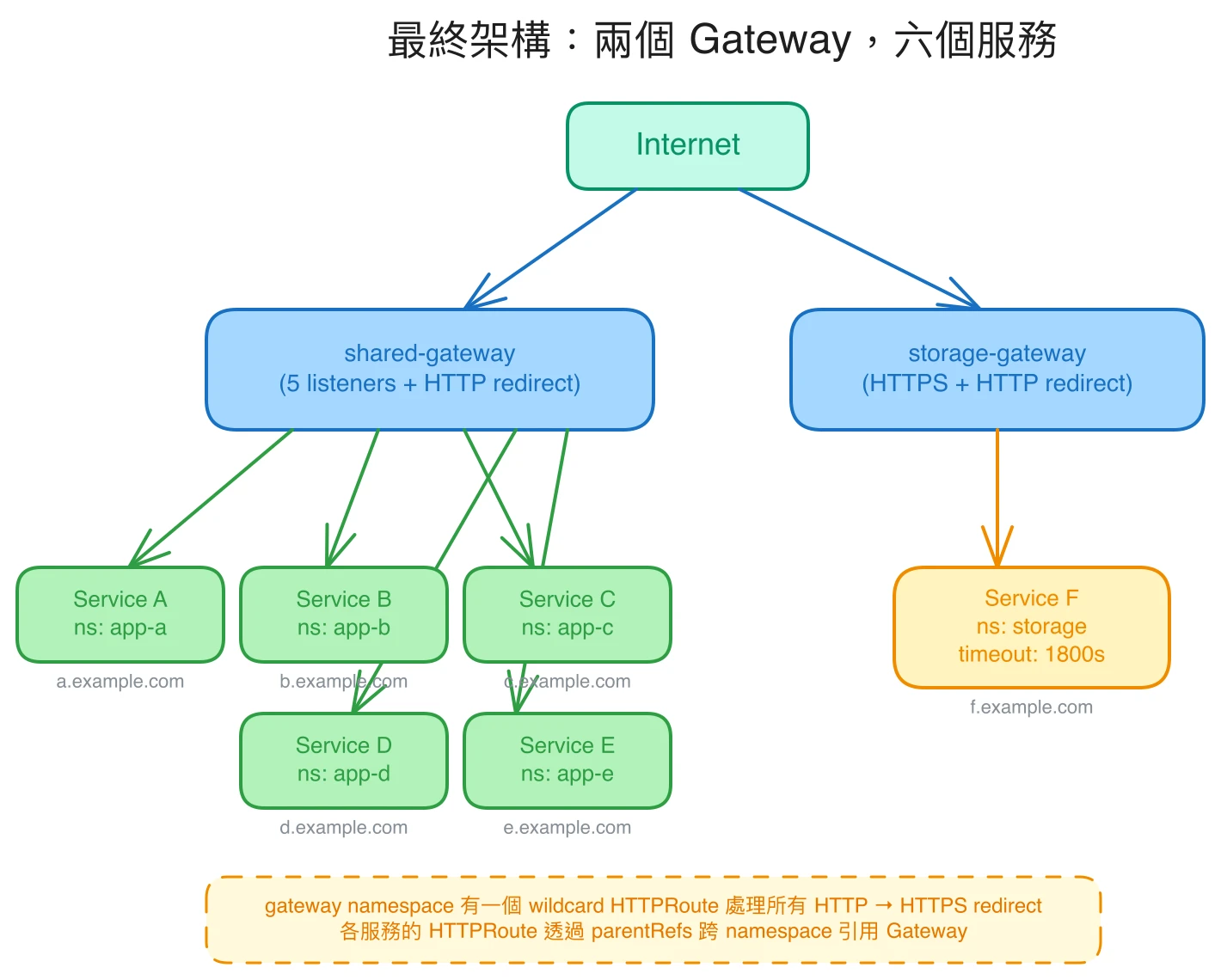
gateway namespace
├── shared-gateway
│   ├── https-app-a    → app-a/svc:80
│   ├── https-app-b    → app-b/svc:8080
│   ├── https-app-c    → app-c/svc:3000
│   ├── https-app-d    → app-d/svc:80
│   ├── https-app-e    → app-e/svc:80
│   └── http           → wildcard 301 redirect

storage namespace
└── storage-gateway
    ├── https          → storage/svc:8080 (timeout: 1800s)
    └── http           → wildcard 301 redirect
小結
Gateway API 比 Ingress API 功能確實完整蠻多,timeout、header 修改、redirect 都是標準欄位,不用靠各家 controller 自定義的 annotation。跨 namespace 的 HTTPRoute 也讓架構設計的彈性大了不少。
不過說實話,如果不是 ingress-nginx deprecated 我大概不會這麼快換,整個遷移還是蠻花時間的,尤其是 cert-manager 的 CRD 所有權轉移那段。如果你的 cert-manager 本來就是 Helm 管理的,遷移應該會順很多,可以試試看。