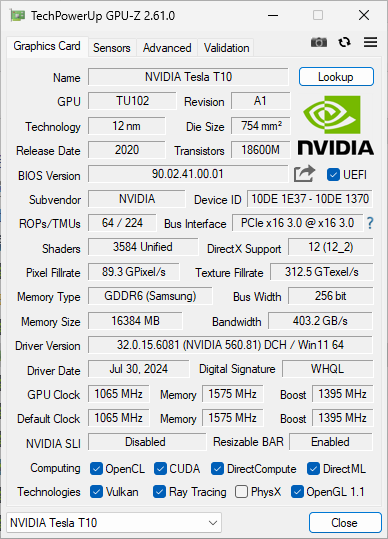
While browsing China's Xianyu recently, I unexpectedly came across a unique graphics card – the Tesla T10. This GPU, originating from professional data centers, was originally designed by NVIDIA specifically for cloud gaming services, primarily used in GeForce NOW cloud gaming servers. Now, these retired cards have entered the second-hand market, currently selling for about 1,350 RMB (approximately $190 USD) on Xianyu. Given the low price, I bought two to study their performance.
Contents
Hardware Specifications and Performance
- 16GB GDDR6 Memory
- 150W TDP Design
- Single-Slot Full-Height Design
- Factory Passive Cooling Design
- PCIe 3.0 x16 Interface
- TU102 Chip
- Base Clock: 1065 MHz
- Max Boost Clock: 1590 MHz
- Memory Clock: 1575 MHz
- Memory Bus: 256-bit
- Video Memory: 16GB GDDR6
Performance Testing
Testing Environment
The testing environments are all VMs.
Linux:
- Ubuntu 24.04 kernel 6.8.0-51-generic
- Nvidia Driver: 550.127.08
- CUDA Version: 12.4
- CPU: Epyc 7413 16-core vCPU
- RAM: 16GiB DDR4 3200 MHz ECC REG
Windows:
- Windows 11 24H2 OS Build 26100.2894
- Nvidia Driver: 560.81 (AWS Cloud Gaming Driver)
- CPU: Epyc 7413 16-core vCPU
- RAM: 16GiB DDR4 3200 MHz ECC REG
Gaming Performance
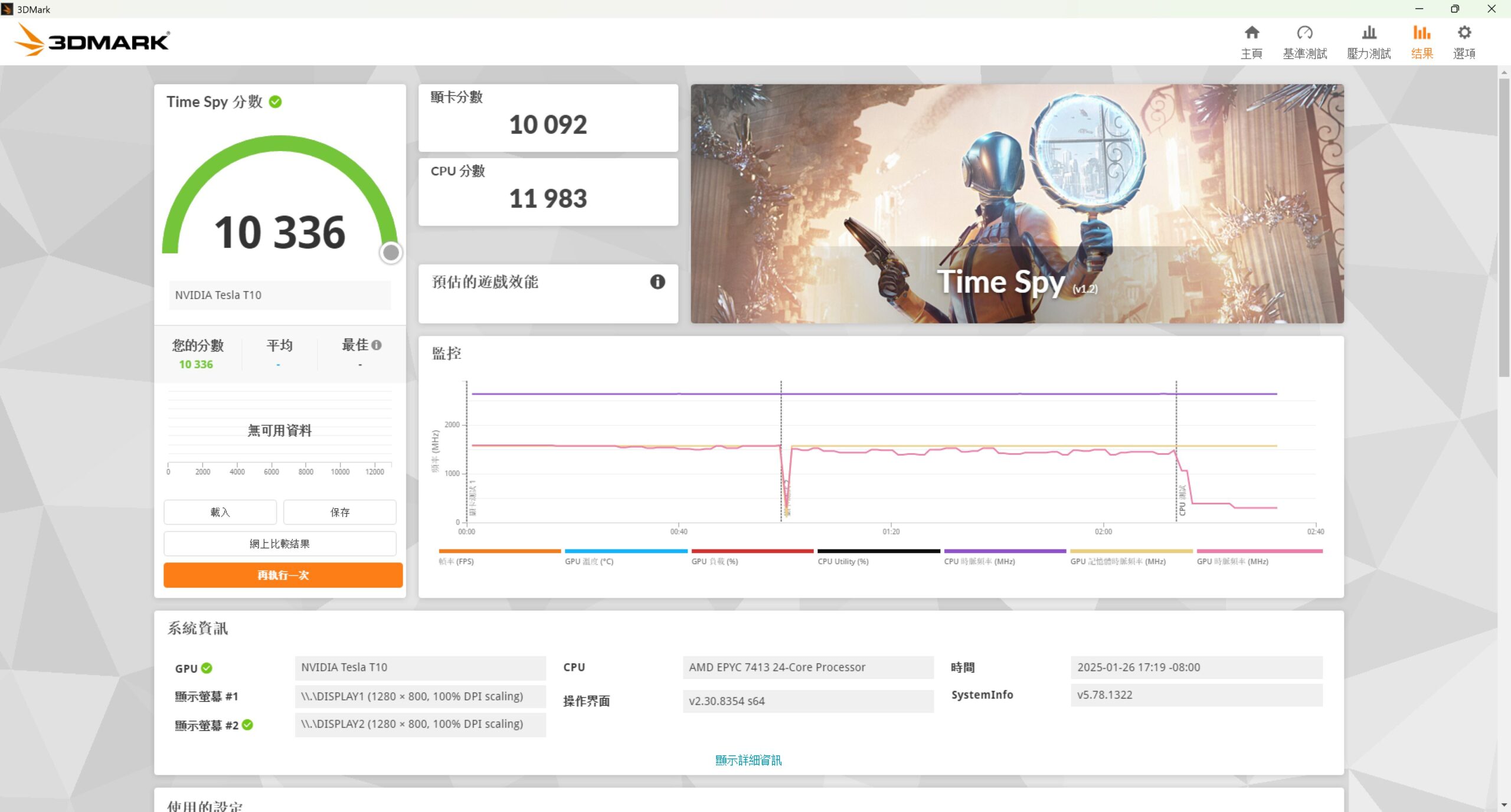
3DMark Time Spy GPU Score:10092
3DMark Steel Nomad Score:2338
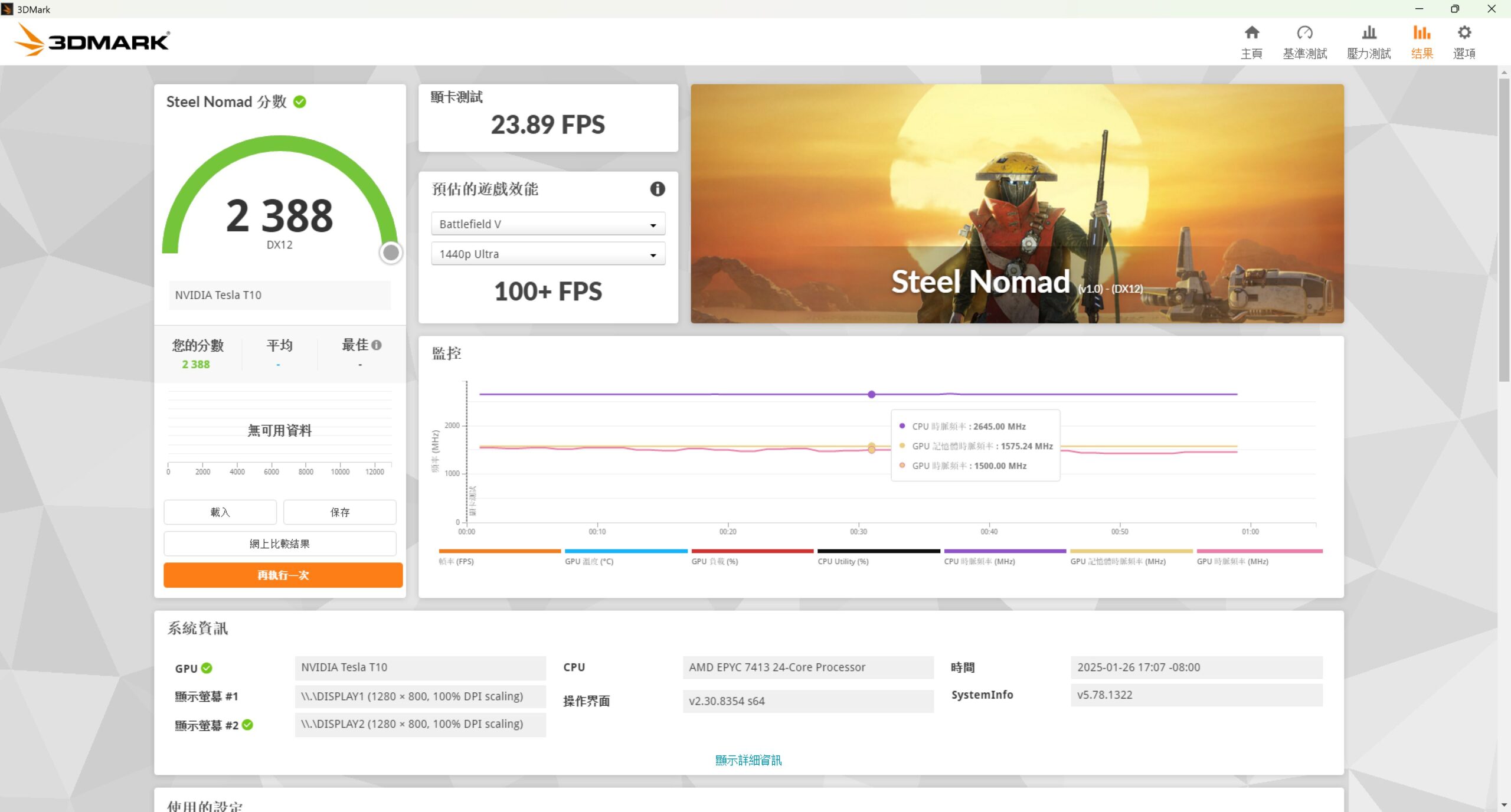
Performance is roughly close to the RTX 2070 Super and RTX 4060.
AI Computing Performance
Using Llama 3 8B model and testing with llama-bench:
Q4_K Quantized Version (4.58 GiB)
| Test Scenario | Generation Speed (tokens/s) |
|---|---|
| 512 tokens | 62.10 |
| 1024 tokens | 60.41 |
| 4096 tokens | 52.43 |
| 8192 tokens | 41.46 |
F16 Full Precision Version (14.96 GiB)
| Test Scenario | Generation Speed (tokens/s) |
|---|---|
| 512 tokens | 24.10 |
| 1024 tokens | 23.85 |
| 4096 tokens | 22.53 |
Testing with 8192 tokens was not possible due to insufficient memory.
Power, Cooling, and Thermal Performance
The maximum power consumption of the graphics card is 150W, while the idle power consumption (P8 state) is approximately 18W.
Since it uses entirely passive cooling, the chassis must provide sufficient airflow to manage its temperatures.
I am using this graphics card in a Dell PowerEdge R7515 server. At full load, a fan speed of approximately 89% PWM can maintain the card's temperature between 82-83°C.
User Experience
Currently, two T10 cards are installed in the Dell PowerEdge R7515: one is used in a Windows environment as a remote gaming machine, and the other is used in a Linux environment as a GPU computing node for Kubernetes.
In practical applications, performance is quite smooth whether playing light-to-medium games or running AI models like phi-4. However, the biggest issue lies in thermal control: if the Dell server's third-party PCIe card LFM (Linear Feet per Minute) mode is disabled, the GPU temperature easily reaches 86°C and triggers thermal throttling while the system fans remain at a low speed. Conversely, if LFM mode is enabled, the fans stay at a constant 89% PWM, increasing total system power consumption by about 100W—which is not ideal in a colocation environment with high electricity costs. The current workaround is to manually adjust the fan speed only when needed.
At a price of 1,350 RMB (approximately $190 USD), this graphics card offers excellent value for money. I recommend it to interested enthusiasts looking to pick one up.
Pros
- Nvidia vGPU Support
- 16GB high-capacity VRAM with ECC support
- Space-saving single-slot design
- Excellent AI computing performance
Cons
- Requires additional cooling solutions
- High temperature control requirements
- Power limit restricts chip performance
- No display output ports
Conclusion
The Tesla T10 perfectly demonstrates a 'second life' for server-grade hardware in the consumer market. For users who can overcome its thermal limitations and require powerful computing capabilities or VDI solutions, it is a highly attractive option. It is especially recommended for users with basic hardware knowledge who are willing to invest time in optimization.
Buying Advice
Suitable for:
- AI enthusiasts on a budget
- Professional users requiring high VRAM capacity
- Users requiring VDI GPU acceleration solutions
Not suitable for:
- General consumers
- Users seeking a plug-and-play experience

