Table of Contents
Introduction
When CPU, memory, or I/O resources become saturated, workloads experience increased latency, degraded performance, and may ultimately face OOM (Out of Memory) termination. Without proper monitoring to detect such saturation, users are forced to manually protect their workloads by reserving hardware resources, often leading to inefficiencies due to over-provisioning. Starting with Linux kernel 4.20, the Linux kernel introduced PSI (Pressure Stall Information), a new metric that enables users to precisely understand how resource shortages impact overall system performance. This article will provide a brief overview of PSI and explain how to interpret its data.
Overview
PSI provides the first comprehensive way to observe resource pressure, offering new metrics for three major resources—memory, CPU, and I/O.
These pressure metrics, combined with cgroup2 and other kernel and user space tools, allow you to detect resource shortages early, and then take proactive actions such as suspending or terminating non-essential processes, reallocating memory within the system, reducing workload pressure, or taking other corrective measures.
PSI acts like an early warning system, providing alerts about imminent resource shortages so you can take timely, effective, and granular steps before performance degrades significantly.
Pressure Metric Interface
Each resource's pressure metric can be accessed via its corresponding file: /proc/pressure for example,cpu、memory和io。
You can retrieve the corresponding pressure metrics for each resource using the following commands:
$ cat /proc/pressure/resource_name
The output format is as follows:
some avg10=0.42 avg60=0.18 avg300=0.14 total=2539018569
full avg10=0.00 avg60=0.00 avg300=0.00 total=0
It includes two metrics:some 和 fulland their average values over 10 seconds, 1 minute, and 5 minutes.total The third value is the total time measured in microseconds.
Pressure Metrics overview
After knowing how to retrieve pressure data, the next step is to understand how to interpret these metrics.
some
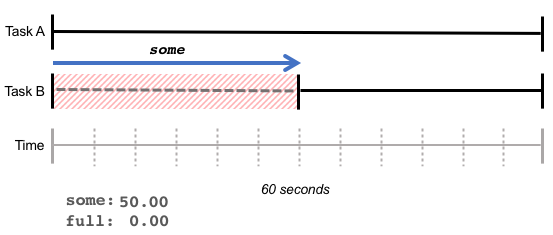
some For instance, a high value may indicate that a task has been delayed due to insufficient memory, resulting in a 50% delay in execution.
In the chart below, Task A runs without delay, while Task B must wait 30 seconds to obtain memory, causing some values to reach 50%.

some Indicates the additional waiting time due to insufficient resources; the total amount of work completed by the CPU may remain unchanged, but some tasks may take longer.
full
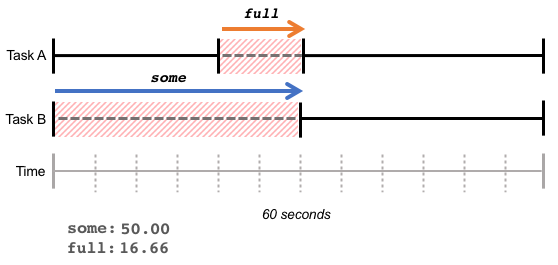
full Indicates the percentage of total time spent waiting due to insufficient resources, i.e., no actual processing time.
In the following example, task B waits for 30 seconds; within these 30 seconds, task A also waits for 10 seconds. This results in full 16.66% (10 seconds / 60 seconds)some 50.00% (30 seconds / 60 seconds)

高 full Indicates the overall loss of processing capacity due to insufficient resources, resulting in a reduced total amount of work completed.
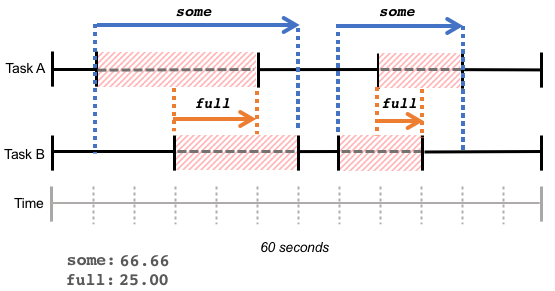
Please note that these statistics reflect the cumulative waiting time for tasks within a given period, regardless of whether the waiting times are continuous (as in the example above) or scattered across the same timeframe, as shown in the diagram below:

Monitor PSI
We can monitor the system's PSI through node_exporter. node_exporter has pressure collector enabled by default, which allows us to obtain the following information:
- node_pressure_cpu_waiting_seconds_total
- node_pressure_io_stalled_seconds_total
- node pressure io waiting seconds total
- node pressure memory stalled seconds total
- node pressure memory waiting seconds total
The switch forwards the packet from compute node 1 to compute node 2
The pressure metric can be used to assess recent delays, or to examine delays before and after certain tasks, to determine their correlation with resource usage. Users can leverage this metric to better understand whether the system exhibits resource contention behavior and take appropriate actions to resolve it.
Reference
Copyright Notice: All articles in this blog are licensed under CC BY-NC-SA 4.0 unless otherwise stated.