
Recently, I've been reviewing a lot of OpenStack nova code for work-related reasons, so I decided to write a series of articles to document how nova works. This first post will start with the nova-scheduler component. I will guide readers through the code level to understand how the conductor calls the scheduler and how the scheduler's decision-making process works.
This article is based on Victoria, the latest stable version at the time of writing.
Table of Contents
Introduction to nova-scheduler
nova-scheduler is designed as a plugin-based scheduler, allowing users to write their own scheduler drivers according to their needs. By default, nova enables the one provided within its own codebase: Filter Scheduler。
The operating principle of the Filter scheduler is very simple. Essentially, all hosts pass through a series of 'filters'. If a host doesn't meet the filter criteria, it is excluded; if it does, it passes through to the final selection pool. These filtered hosts are then ranked via weighing, and one host is randomly selected from the top candidates to host the VM. For a simple workflow, you can refer to the diagram in the official documentation:
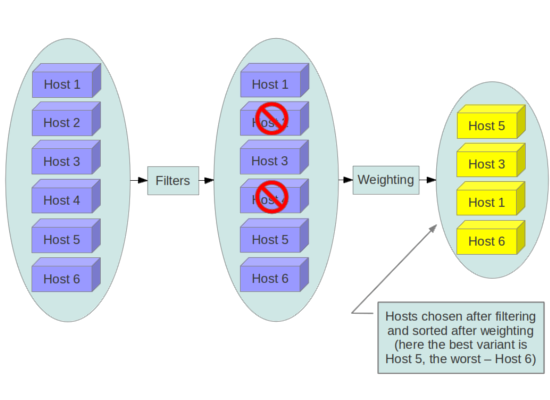
OpenStack itself provides severalCommonly used filters, and you can also write and enable custom filters in the configuration based on your specific needs.Weigher similarly provides some commonly used ones, and you can also write your own as needed.
What methods does the nova-scheduler driver have?
We can see from Nova-scheduler Driver Base Class contains four methods:
- __init__
- Run periodic tasks
- hosts_up
- Select destinations
__init__
As the name suggests, init is for initializing this class, helping you obtain the host manager and service group API objects.
Run periodic tasks
The purpose of this method is also easy to discern. Logic that needs to be executed periodically is placed within this method; in the base class, it simply uses 'pass' and does not implement any logic.
hosts_up
The hosts_up method returns a list of hosts that are running a service or topic.
Select destinations
`select_destinations` is the essence of the entire scheduler; the logic for selecting a host is implemented within this method. `nova-conductor` calls this method when scheduling an instance.
How nova-scheduler works as a whole
Currently, most internal tasks in Nova are handled by the conductor. From the conductor manager code, we can find a function responsible for scheduling instances.:
def _schedule_instances(self, context, request_spec,
                        instance_uuids=None, return_alternates=False):
    scheduler_utils.setup_instance_group(context, request_spec)
    with timeutils.StopWatch() as timer:
        host_lists = self.query_client.select_destinations(
            context, request_spec, instance_uuids, return_objects=True,
            return_alternates=return_alternates)
    LOG.debug('Took %0.2f seconds to select destinations for %s '
              'instance(s).', timer.elapsed(), len(instance_uuids))
    return host_lists
From the code, we can see that the conductor manager scheduler 的 query client calls select_destinations 這個 method,這個 call 最後會透過 rpc 送去 nova-scheduler driver 的 select destination 做處理。
在經過上述提到的 filter 跟 weigher 後,select destination 會 return 一個包含每個 instance destination 的 selection object。
Conclusion
nova-scheduler 整體的流程其實非常的簡單易懂,driver based 的設計也可以讓使用者能夠很彈性的根據自身需求替換 scheduler,就算是使用內建的 filter scheduler 也可以輕易的撰寫自己的 filter。這樣的設計個人認為來說是非常的不錯,不過目前在 host 跟同時要 schedule 的 instance 多的時候可能會遇上一些效能問題,可能會需要拆分 nova cell 來做解決。
Reference
https://docs.openstack.org/nova/latest/user/filter-scheduler.html
https://github.com/openstack/nova/tree/stable/victoria
Copyright Notice: All articles in this blog are licensed under CC BY-NC-SA 4.0 unless otherwise stated.

